Close To
Description
The close_to function positions one mobject near another, testing various directions to avoid collisions with the obstacle_mobjects.
This function is useful when next_to may cause overlaps with other mobjects.
Often used for labeling a submobject of a complex mobject like a network graph.
Parameters
mobject_or_point(Mobject | Point3D): The target mobject or point to place this mobject near.obstacle_mobjects(Sequence[Mobject]): Mobjects that may cause collisions. Often, iscanvas.mobjects(all mobjects added so far) orsome_mobject.get_family()(a mobject and all its submobjects).direction(Vector3, default=RIGHT): The default direction to place this mobject relative to the target.buff(float, default=DEFAULT_MOBJECT_TO_MOBJECT_BUFFER): The buffer distance between the mobjects.
Examples
Example 1
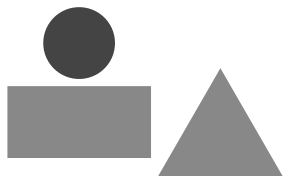
A circle placed close to a rectangle, avoiding collision with a triangle.
from smanim import *

circle = Circle(radius=0.5, color=DARK_GRAY)
rect = Rectangle(color=GRAY)
triangle = Triangle(color=GRAY).next_to(rect, RIGHT)
# direction RIGHT causes collision so the circle is positioned UP
circle.close_to(rect, [rect, triangle], direction=RIGHT)
canvas.add(circle, rect, triangle)
canvas.draw(crop=True, ignore_bg=True)
Example 2
Several labels placed close to submobjects of a complex mobject (like a network graph).
Avoids mobject collisions that next_to would cause.
from smanim import *

vertices = [0, 1, 2, 3, 4]
edges = [(0, 1), (1, 2), (1, 3), (2, 3), (3, 0), (3, 4)]
g = Graph(
    vertices=vertices, edges=edges, layout="circular", include_vertex_labels=True
)
labels = Group()
for v in g.vertices.values():
    t = Text("∞").close_to(v, g.get_family())
    labels.add(t)
canvas.add(g, labels)
canvas.draw(crop=True)
