---
sidebar_position: 2
title: Next To
slug: next-to
overview_position: 24
---
# Next To
### Description
The `next_to` function is used to place one mobject next to another mobject in the specified direction, optionally adding buffer and edge alignment.
Use `close_to` instead to avoid collisions with other mobjects that `next_to` might cause, though `close_to` also requires specifying potentially colliding mobjects.
#### Parameters
- `mobject_or_point` (`Mobject | Point3D`): The target mobject or point to place this mobject next to.
- `direction` (`Vector3`, default=`RIGHT`): The direction to place this mobject relative to the target. Must be a bounding box point (e.g., `UP`, `DOWN`, `LEFT`, `RIGHT`).
- `aligned_edge` (`Vector3 | None`, optional): The edge to align perpendicular to `direction`.
- `buff` (`float`, default=`DEFAULT_MOBJECT_TO_MOBJECT_BUFFER`): The buffer distance between the mobjects.
### Examples
#### Example 1
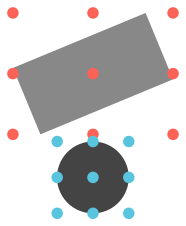
A circle beneath a rotated rectangle.
Note: Bounding box points are shown for demo purposes. They are not included in the code.
```python
from smanim import *
circle = Circle(radius=0.5, color=DARK_GRAY)
rect = Rectangle(color=GRAY).rotate(PI / 8)
circle.next_to(rect, DOWN)
canvas.add(circle, rect)
canvas.draw(crop=True, ignore_bg=True)
```
 #### Example 2
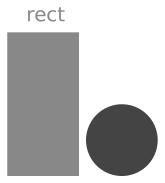
A circle to the right of a rectangle, with their bottom (down) edges aligned. A Text label above the rectangle.
```python
from smanim import *
circle = Circle(radius=0.5, color=DARK_GRAY)
rect = Rectangle(width=1, height=2, color=GRAY)
circle.next_to(rect, RIGHT, DOWN)
rect_label = Text("rect", color=GRAY).next_to(rect, UP)
canvas.add(circle, rect, rect_label)
canvas.draw(crop=True, ignore_bg=True)
```
#### Example 2
A circle to the right of a rectangle, with their bottom (down) edges aligned. A Text label above the rectangle.
```python
from smanim import *
circle = Circle(radius=0.5, color=DARK_GRAY)
rect = Rectangle(width=1, height=2, color=GRAY)
circle.next_to(rect, RIGHT, DOWN)
rect_label = Text("rect", color=GRAY).next_to(rect, UP)
canvas.add(circle, rect, rect_label)
canvas.draw(crop=True, ignore_bg=True)
```